
jcthorne
Well-known member
First Amazon links to the 3 products required to install.
Binize CarPlay AI Box - Only buy this particular one, direct from Binize. It will have the updated software that works with the CanAm Spyders already installed https://www.amazon.com/dp/B0C2L5G1FK
Motorcycle SAE to USB power supply - https://www.amazon.com/dp/B0DB5S6W9W
Motorcycle SAE charging leads - https://www.amazon.com/PACK-Sae-Ring-Terminal-Harness/dp/B09GFTBJ3F
You will have to have a Bluetooth headset already paired to your bike and powered on for this to work just as for CarPlay without this box. A microphone and speakers are required and the headset is how this bike get those connected to CarPlay and now Android Auto.
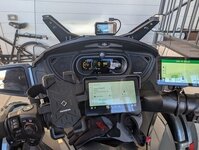
Installation is simple. The Binize AI Box comes with a T-shape USB cable that will connect to your bike and the box. The extra lead goes to the USB power supply that will power the box BEFORE the instrument cluster powers up and looks for a CarPlay connection.
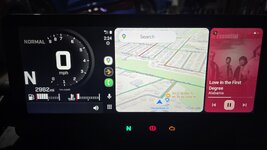
Plug it all in, boot up the instrument cluster and the setup screen will come up instead of CarPlay. The cluster and box may need to reboot a couple of cycles to auto determine and format the image to fit the Can Am screen. Once you have the Android system up and running, launch the Autokit app to start Android Auto and pair your phone to the Binize box. Once you have it connected, you can go into settings on the Binize box to auto launch Autokit each time your bike connects. This will have the system come up in Android Auto every time you turn on the bike. Wirelessly. No need to plug in your phone!
Next, if you are a CarPlay user, this box can connect wirelessly to an iPhone as well giving you wireless CarPlay.
Lastly, the Binize box can function without a phone connection at all if you install a sim card in it for wireless connectivity and the apps, including unrestricted full video, run directly on the box. I had no need for this while riding so did not explore that system much.
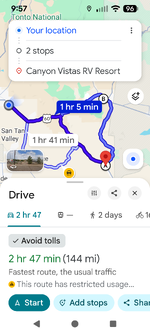
I have had this system on my F3 for a couple weeks now and several rides and the it has worked perfectly. Starts up and launches each and every time the bike is turned on. Even remembers what I was listening to (I use an app called PlexAmp to use my large music library at home and on my phone). Google Assistant works great through the headset. I have searched for locations and navigated there using voice command as well as asking for weather and news.
I think this is sufficient information to get folks thoroughly confused so I will stop here but feel free to ask questions. I am not selling anything here, I do not have a business relationship with Binize other than I purchased the product (adaptor box number 23 that I tried) and worked with their development staff to squash a few bugs and get this working smoothly. ENJOY!
Last edited:


![Screenshot_20260209-113634[1].png](https://www.spyderlovers.com/data/attachments/161/161749-54bf7a7b3d7d15370b61c184a24ec8b3.jpg?hash=DftcLIxJR6 "Screenshot_20260209-113634[1].png")