
-
There were many reasons for the change of the site software, the biggest was security. The age of the old software also meant no server updates for certain programs. There are many benefits to the new software, one of the biggest is the mobile functionality. Ill fix up some stuff in the coming days, we'll also try to get some of the old addons back or the data imported back into the site like the garage. To create a thread or to reply with a post is basically the same as it was in the prior software. The default style of the site is light colored, but i temporarily added a darker colored style, to change you can find a link at the bottom of the site.
You are using an out of date browser. It may not display this or other websites correctly.
You should upgrade or use an alternative browser.
You should upgrade or use an alternative browser.
A little Can Bus tutorial
- Thread starter IdahoMtnSpyder
- Start date


robmorg
New member
One would think so. Thanks, Billy.For others reading this replacing the horn for another one has nothing to do with the CAN BUS.
Yes there is a lot of stuff on that circuit. Sure it's a good idea to use a relay. Also how rugged is the horn switch to handle the extra current? :dontknow: But on the practical side a lot of people seem to have connected their horn without any ill effects. Any problems should have showed up by now.
The reason I thought of this, in connection with this can-bus thread, was this statement made by IdahoMtnSpyder in the OP...
... and the Load Shedding Relay is on the same fuse as the horn. But after reading it again, I see your point.So you see, there is a lot of communication going on among the various modules, but only to the modules. The modules then control everything else, some by controlling power directly such as the turn signals, and some by controlling relays like the load shedding relay which is what controls power to the headlights, grip heaters, etc.

kml354
New member
BertRemington
Active member
CAN-BUS clarification
Clarification on CAN-BUS.
The CAN-BUS protocol is about messages not devices.
That is, every device on the bus broadcasts it's messages with specific identifiers and every device listens to all messages ignoring all but those having the specific identifiers of interest.
There is no device identifier in the protocol just message identifier.
Even the Remote Transmission Request (Remote Frame) message does not specify a device identifier. Rather it specifies the message identifier of interest to which none, one or more devices may respond (the protocol includes prioritization and deconfliction).
We see this behavior as part of our Spyder's Key-On initialization. The console sends out radio-related RTRs and if the appropriate messages are not received in response then disables radio-related functions from the console configuration.
==========
CAN-BUS is designed to be electrically robust but electrical interference can occur. Typically there are two causes: (1) poor grounding of an electrical device that may or may not be on the bus; and (2) coupling (most likely inductive) to nearby circuitry. Proper device selection and care with its installation prevents interference. For instance, my right-side HID electronics are next to the Spyder Diagnostic Link Connector without interference.
==========
Conceptual explanation of the relationship between CAN-BUS and OBD-II.
CAN-BUS is how the Spyder talks* to itself.
OBD-II is how the Spyder talks* to us.
* talks using CAN-BUS messages.
Clarification on CAN-BUS.
The CAN-BUS protocol is about messages not devices.
That is, every device on the bus broadcasts it's messages with specific identifiers and every device listens to all messages ignoring all but those having the specific identifiers of interest.
There is no device identifier in the protocol just message identifier.
Even the Remote Transmission Request (Remote Frame) message does not specify a device identifier. Rather it specifies the message identifier of interest to which none, one or more devices may respond (the protocol includes prioritization and deconfliction).
We see this behavior as part of our Spyder's Key-On initialization. The console sends out radio-related RTRs and if the appropriate messages are not received in response then disables radio-related functions from the console configuration.
==========
CAN-BUS is designed to be electrically robust but electrical interference can occur. Typically there are two causes: (1) poor grounding of an electrical device that may or may not be on the bus; and (2) coupling (most likely inductive) to nearby circuitry. Proper device selection and care with its installation prevents interference. For instance, my right-side HID electronics are next to the Spyder Diagnostic Link Connector without interference.
==========
Conceptual explanation of the relationship between CAN-BUS and OBD-II.
CAN-BUS is how the Spyder talks* to itself.
OBD-II is how the Spyder talks* to us.
* talks using CAN-BUS messages.
Last edited:
Clarification on CAN-BUS.
The CAN-BUS protocol is about messages not devices.
That is, every device on the bus broadcasts it's messages with specific identifiers and every device listens to all messages ignoring all but those having the specific identifiers of interest.
==========
Conceptual explanation of the relationship between CAN-BUS and OBD-II.
CAN-BUS is how the Spyder talks* to itself.
OBD-II is how the Spyder talks* to us.
* talks using CAN-BUS messages.
I must be CAN-BUS because after reading this you have me " Talking to MYSELF ", I'm a bit hard of hearing, but the OBD-II must not be working because I haven't heard a word out of my Spyder! Thanks for the info though. :thumbup: Bill
If you understand LAN protocols, each device has an address.
In a packet of data sent from anything it has a address in the header for the destination component.
It's not that the VSS doesn't talk to the radio, the radio actually does see the packet the VSS sent but it just ignores it as the packet is not addresses to it.
Bob
That helps.
BertRemington
Active member
CAN-BUS is not a LAN
I was trying be careful in not saying it but now I must: CAN-BUS is not a LAN.
Without over-simplifying too much:
* CAN-BUS carries complete messages; LAN carries packets with complete, incomplete and multiple contents (messages)
* CAN-BUS "addresses" are device-independent message identifiers; LAN "addresses" are content-independent device identifiers (multicast is special "device" address)
* CAN-BUS uses a robust two-wire signalling protocol with simple message prioritization, deconfliction and filtering rules implemented with cheap chips (eg MCP2515 and MCP2551); automotive LAN 10xxBASE-T1 uses a single twisted pair which provides inter-device packet exchange using a variety of line codes (and chip families) and requiring additional chips for device-unique higher-level content (message) processing.
As our vehicles evolve to "software carriers" and MCUs are replaced with CPUs, CAN-BUS will likely remain for "transport-critical" functions while LAN is introduced for non-critical functions. I doubt the Spyder radio will ever move from CAN-BUS to LAN but I'm pretty sure your Mercedes radio already has.
==========
Adding a note about OBD-II and Spyders. OBD-II requires certain standard messages for specific emission certifications. Spyders aren't required to meet those certifications (note the lack on your under-seat stickers) and therefore is using manufacturer-unique OBD-II messages (allowed by the standard). Which I learned at the cost of $100 in hardware and software.
I was trying be careful in not saying it but now I must: CAN-BUS is not a LAN.
Without over-simplifying too much:
* CAN-BUS carries complete messages; LAN carries packets with complete, incomplete and multiple contents (messages)
* CAN-BUS "addresses" are device-independent message identifiers; LAN "addresses" are content-independent device identifiers (multicast is special "device" address)
* CAN-BUS uses a robust two-wire signalling protocol with simple message prioritization, deconfliction and filtering rules implemented with cheap chips (eg MCP2515 and MCP2551); automotive LAN 10xxBASE-T1 uses a single twisted pair which provides inter-device packet exchange using a variety of line codes (and chip families) and requiring additional chips for device-unique higher-level content (message) processing.
As our vehicles evolve to "software carriers" and MCUs are replaced with CPUs, CAN-BUS will likely remain for "transport-critical" functions while LAN is introduced for non-critical functions. I doubt the Spyder radio will ever move from CAN-BUS to LAN but I'm pretty sure your Mercedes radio already has.
==========
Adding a note about OBD-II and Spyders. OBD-II requires certain standard messages for specific emission certifications. Spyders aren't required to meet those certifications (note the lack on your under-seat stickers) and therefore is using manufacturer-unique OBD-II messages (allowed by the standard). Which I learned at the cost of $100 in hardware and software.

IdahoMtnSpyder
Well-known member
Clarification on CAN-BUS.
The CAN-BUS protocol is about messages not devices.
Thanks for the clarification about the "how" of the network messages. It looks like I did have the "what" reasonably correct. I had completely forgotten I made this post nearly 7 years ago!
Adding a note about OBD-II and Spyders. OBD-II requires certain standard messages for specific emission certifications. Spyders aren't required to meet those certifications (note the lack on your under-seat stickers) and therefore is using manufacturer-unique OBD-II messages (allowed by the standard). Which I learned at the cost of $100 in hardware and software.
When I've looked for additional info on Spyder Error Codes I've noticed that many of them are in fact the same ID and explanation as automotive codes, particularly those related to engine operations that affect emissions.
The Spyder CanBus system is much the same as industrial control systems, right? And there are a bunch of them! https://en.wikipedia.org/wiki/List_of_automation_protocols

CloverHillCrawler
Well-known member
Clarification on CAN-BUS.
==========
Conceptual explanation of the relationship between CAN-BUS and OBD-II.
CAN-BUS is how the Spyder talks* to itself.
OBD-II is how the Spyder talks* to us.
* talks using CAN-BUS messages.
I don't know this "update" has me asking questions as this is the first time of me hearing OBDII in relation to the Spyder.
Are you saying that BUDS is using OBD-II as its communication protocol?
BertRemington
Active member
I ain't chasing that OBD rabbit
When gkamer asked about CAN-BUS for Ryker and SportsterDoc cited your 2016 tutorial I took the opportunity to update the community with what I've learned in the last year or so.
Yes the Spyder OBD PIDs match the standard PIDs except ... extracting them using off-the-shelf hardware (OBDlink) and software (OBDwiz) in KWP2000 and CAN-BUS 2.0a (11-bit) message formats didn't work. There is a Service 01 PID 1C - OBD standards this vehicle conforms to but OBDwiz didn't display any helpful information whatsoever. OBDwiz does have a direct command interface to the OBDlink (based on the Hayes AT command set if you can imagine that) but I'm really not that interested* in chasing that rabbit, a chase that began when wlinn1 asked about a HUD and I foolishly thought I can do that. NOT!
I know the PIDs are in there, you just need to know how to ask the Spyder for them. The best approach would be to have a CAN-BUS sniffer listening while a BUDS is requesting and receiving them. And a pre-BUDS2 Spyder (pre-2017) will probably be easier to decode than later Spyders.
If someone wants to use the AT command capability of OBDwiz to decode the OBD PIDs the Spyder is generating, I'll loan them my OBDlink, OBDwiz (I have an unused activation) and the 6-pin Deutsch DT connector. Start by researching the software here https://www.scantool.net/obdwiz and the forum here https://www.scantool.net/forum/index.php
* My interest is specific device-level messages such as LT button pressed, RT button pressed, etc and I've decoded those.
When gkamer asked about CAN-BUS for Ryker and SportsterDoc cited your 2016 tutorial I took the opportunity to update the community with what I've learned in the last year or so.
Yes the Spyder OBD PIDs match the standard PIDs except ... extracting them using off-the-shelf hardware (OBDlink) and software (OBDwiz) in KWP2000 and CAN-BUS 2.0a (11-bit) message formats didn't work. There is a Service 01 PID 1C - OBD standards this vehicle conforms to but OBDwiz didn't display any helpful information whatsoever. OBDwiz does have a direct command interface to the OBDlink (based on the Hayes AT command set if you can imagine that) but I'm really not that interested* in chasing that rabbit, a chase that began when wlinn1 asked about a HUD and I foolishly thought I can do that. NOT!
I know the PIDs are in there, you just need to know how to ask the Spyder for them. The best approach would be to have a CAN-BUS sniffer listening while a BUDS is requesting and receiving them. And a pre-BUDS2 Spyder (pre-2017) will probably be easier to decode than later Spyders.
If someone wants to use the AT command capability of OBDwiz to decode the OBD PIDs the Spyder is generating, I'll loan them my OBDlink, OBDwiz (I have an unused activation) and the 6-pin Deutsch DT connector. Start by researching the software here https://www.scantool.net/obdwiz and the forum here https://www.scantool.net/forum/index.php
* My interest is specific device-level messages such as LT button pressed, RT button pressed, etc and I've decoded those.
BertRemington
Active member
CloverHill -- explaining something conceptually is tricky so here's some additional information.
In both cases the "communications protocol" is CAN-BUS.
When talking to itself, the messages are "internal use only" specific to the Spyder.
When talking to us via the BUDS laptop and Spyder console, the messages are defined by the OBD-II standard.
Special qualification: while the BUDS laptop and Spyder console display "OBD-style" B/C/P/U codes, I don't know for sure the messages themselves are in OBD-II format. It just seems to me with an ECM, TCM, etc designed and built by Bosch who is the standard-setter that the messages would be in OBD-II format, just not in the emissions certification OBD-II format off-the-shelf OBD-II software (eg, my OBDwiz) recognizes. But that's a hypothesis not a certainty that I will continue with.
Only the BUDS laptop, Spyder console and certain top-line diagnostic equipment know how to request and decode Spyder OBD-II messages.
The BUDS laptop and the Spyder console are using the Spyder CAN-BUS (accessed by the laptop at the 6-pin Deutsch Data Link Connector) to transmit OBD messages and receive the responses.
For the B/C/P/U DTCs, the Service 03 - Show stored Diagnostic Trouble Codes message is broadcast that when recognized by specific Spyder devices (eg, ECM TCM*) broadcast in response DTC messages that are decoded and presented to us on the laptop and console as B/C/P/U codes.
* I believe each device responds with its own DTCs but there's a possibility the console serves as the central collection and response interface.
Real-time data is requested and returned using the Service 01 - Show current data PID. It was this information I hoped could feed a HUD but I couldn't request/decode it with OBDwiz.
It's easier to understand these interactions by examining CAN-BUS and OBD-II separately. That is, don't think about CAN-BUS when figuring out how OBD-II works and vice versa.
In both cases the "communications protocol" is CAN-BUS.
When talking to itself, the messages are "internal use only" specific to the Spyder.
When talking to us via the BUDS laptop and Spyder console, the messages are defined by the OBD-II standard.
Special qualification: while the BUDS laptop and Spyder console display "OBD-style" B/C/P/U codes, I don't know for sure the messages themselves are in OBD-II format. It just seems to me with an ECM, TCM, etc designed and built by Bosch who is the standard-setter that the messages would be in OBD-II format, just not in the emissions certification OBD-II format off-the-shelf OBD-II software (eg, my OBDwiz) recognizes. But that's a hypothesis not a certainty that I will continue with.
Only the BUDS laptop, Spyder console and certain top-line diagnostic equipment know how to request and decode Spyder OBD-II messages.
The BUDS laptop and the Spyder console are using the Spyder CAN-BUS (accessed by the laptop at the 6-pin Deutsch Data Link Connector) to transmit OBD messages and receive the responses.
For the B/C/P/U DTCs, the Service 03 - Show stored Diagnostic Trouble Codes message is broadcast that when recognized by specific Spyder devices (eg, ECM TCM*) broadcast in response DTC messages that are decoded and presented to us on the laptop and console as B/C/P/U codes.
* I believe each device responds with its own DTCs but there's a possibility the console serves as the central collection and response interface.
Real-time data is requested and returned using the Service 01 - Show current data PID. It was this information I hoped could feed a HUD but I couldn't request/decode it with OBDwiz.
It's easier to understand these interactions by examining CAN-BUS and OBD-II separately. That is, don't think about CAN-BUS when figuring out how OBD-II works and vice versa.
BertRemington
Active member
IdahoMtnSpyder
That is a fun list. I bookmarked it. Thanks.
Yep CAN (BUS) is on that list. Although I'm pretty sure my and earlier Spyders use KWP2000 which is also on the list. I surmised this from this service manual picture.
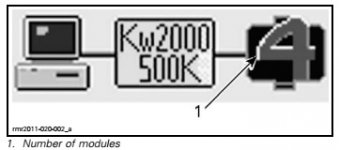
And the CAN-BUS does run at 500kbps.
PS I said CAN-BUS was cheap and Wikipedia agreed with me.
The Spyder CanBus system is much the same as industrial control systems, right? And there are a bunch of them! https://en.wikipedia.org/wiki/List_o...tion_protocols
That is a fun list. I bookmarked it. Thanks.
Yep CAN (BUS) is on that list. Although I'm pretty sure my and earlier Spyders use KWP2000 which is also on the list. I surmised this from this service manual picture.
And the CAN-BUS does run at 500kbps.
PS I said CAN-BUS was cheap and Wikipedia agreed with me.
Last edited:

BoatFixx
Member
I hope this link works.
https://www.roadrunner.travel/artic...can-bus-can/?ref=roadrunner-weekly-newsletter
https://www.roadrunner.travel/artic...can-bus-can/?ref=roadrunner-weekly-newsletter
Just a question, I removed the radio box on the right side, because I got my bike molded for an single din stereo. There was a silver braid connected to my antenna, I left it loose, installed my radio and speakers, next I removed my old led strips and added new ones. When I put everything back together, I don't have tail lights, head lights and brake lights but the bike cranks and everything else works. I'm confused. You are very knowledgeable can you help me please?There has been some misunderstanding here about what the Can Bus is and isn't on our Spyders, and what it affects. CAN refers to Controller Area Network. Can Bus generally refers to a communication protocol among various components on the Spyder. Here is a overview of the network.

Brake lights, tail lights, and headlights all are powered by 12 volt lines controlled by switches and relays. Turn signals are the only lights tied into the Can Bus, and then not directly. TS are operated by the cluster which communicates with the left side multi-switch via the Can Bus network.
Looking at the diagram you can see that all the various controllers communicate over the network, the engine, the stability system, the power steering, the radio, the left switch, and so on. But they do not all communicate with every other one. The engine doesn't talk to the MSL or the radio. But the MSL talks to the radio and to the cluster. The VSS talks to the ECM but not the radio. Nobody on the network talks to the brake light, but the brake light switch is one of the inputs to the ECM, which has as one of its functions cruise control. The engine and transmission talk to each other, and the MSL talks to the SE transmission module, which is how the shifting is controlled.
So you see, there is a lot of communication going on among the various modules, but only to the modules. The modules then control everything else, some by controlling power directly such as the turn signals, and some by controlling relays like the load shedding relay which is what controls power to the headlights, grip heaters, etc.
This is probably somewhat rambling and confusing to some, but hopefully it'll help us all understand the role of the Can Bus a little bit better. If I didn't make something clear enough ask away.

Just a question, I removed the radio box on the right side, because I got my bike molded for an single din stereo. There was a silver braid connected to my antenna, I left it loose, installed my radio and speakers, next I removed my old led strips and added new ones. When I put everything back together, I don't have tail lights, head lights and brake lights but the bike cranks and everything else works. I'm confused. You are very knowledgeable can you help me please?
Just be aware that this thread/that post you quoted was started/went up quite a few years ago now, and the originator of the thread/the post you quoted hasn't logged on to the Forum for a while, altho AFAIK, he's still around and looks in occasionally. So while the discussion following that initial post may help you and someone else may answer (not me tho, sorry, but my realm of expertise these days is elsewhere, I come from/got my auto engineering quals back in the days of points & carby jets!) you probably don't want to hold your breath expecting an answer from @IdahoMtnSpyder. He might drop in, but don't count on it!

This is why it ALWAYS pays to check the date on the first post in any thread AND at least the last few posts before replying &/or asking a question of any of the members posting in the thread. It's usually a good idea to try and keep all the related info in the one thread if at all possible/reasonable (otherwise we'll end up with a multitude of partly helpful threads like all the oil & tire threads
 ), just don't expect direct answers/rapid replies/possibly any reply from members who haven't been around for a while. You can see when a member/poster joined and when they last visited the Forum by clicking on their Avatar pic, the one in the round window above their username.
That said, as has been mentioned elsewhere, LED's only work if you've connected their polarity the right way around, and many of us have come across similar issues to those you describe simply because an LED was installed with the polarity backwards. This can be a right pain to track down if you've installed a bunch of individual LED's, but when you've got a string of them in a circuit, often all it takes is one dud, or one installed the wrong way to stop that circuit from working at all... sorta like some Christmas tree lights. So have you checked that ALL your LED's are working and connected the right way around??

Sorry, I'll check the dates next time. My leds are a kit and they are all plugged. So If they polarity is wrong, it comes from the factory. It doesn't explains why everything else works.Just be aware that this thread/that post you quoted was started/went up quite a few years ago now, and the originator of the thread/the post you quoted hasn't logged on to the Forum for a while, altho AFAIK, he's still around and looks in occasionally. So while the discussion following that initial post may help you and someone else may answer (not me tho, sorry, but my realm of expertise these days is elsewhere, I come from/got my auto engineering quals back in the days of points & carby jets!) you probably don't want to hold your breath expecting an answer from @IdahoMtnSpyder. He might drop in, but don't count on it!
This is why it ALWAYS pays to check the date on the first post in any thread AND at least the last few posts before replying &/or asking a question of any of the members posting in the thread. It's usually a good idea to try and keep all the related info in the one thread if at all possible/reasonable (otherwise we'll end up with a multitude of partly helpful threads like all the oil & tire threads
That said, as has been mentioned elsewhere, LED's only work if you've connected their polarity the right way around, and many of us have come across similar issues to those you describe simply because an LED was installed with the polarity backwards. This can be a right pain to track down if you've installed a bunch of individual LED's, but when you've got a string of them in a circuit, often all it takes is one dud, or one installed the wrong way to stop that circuit from working at all... sorta like some Christmas tree lights. So have you checked that ALL your LED's are working and connected the right way around??
Sorry, I'll check the dates next time. My leds are a kit and they are all plugged. So If they polarity is wrong, it comes from the factory. It doesn't explains why everything else works.
Have you actually tried swapping the polarity anywhere?? Maybe even on the Spyder end?
More than one member here has been caught out by the Spyder's wiring being the reverse of what it's meant to be &/or what the documentation says it should be, and swapping the polarity shouldn't hurt the LED's either individually or as a kit; but the bottom line is that if you've got one LED or a string of LED's connected the wrong way around, they just won't work, even if the filament globes you just took out of that circuit all worked a moment before.
So again, I'd suggest you check the polarity of your LED's - heck, if you're concerned, just connect the + & - wires of the kit &/or each individual LED in turn to a suitably fused lead direct from the battery; and if they don't work one way, try them the other way! At the very least, you'll establish that the LED's in the kit DO actually work... or not! And along the way, you juuuust might find out why they don't work the way you've currently got them installed.
It shouldn't take long, and it shouldn't hurt anything - LED's connected with their polarity the wrong way around don't blow, they just don't work, exactly what you've told us they're doing at the moment. And even if they still don't work, you will have positively exclude polarity as being an issue.
My leds works find, my headlights, tail lights and brake lights in the back don't work. Fuse F1 and F2 has 3 volts. That's my problem.Have you actually tried swapping the polarity anywhere?? Maybe even on the Spyder end?
More than one member here has been caught out by the Spyder's wiring being the reverse of what it's meant to be &/or what the documentation says it should be, and swapping the polarity shouldn't hurt the LED's either individually or as a kit; but the bottom line is that if you've got one LED or a string of LED's connected the wrong way around, they just won't work, even if the filament globes you just took out of that circuit all worked a moment before.
So again, I'd suggest you check the polarity of your LED's - heck, if you're concerned, just connect the + & - wires of the kit &/or each individual LED in turn to a suitably fused lead direct from the battery; and if they don't work one way, try them the other way! At the very least, you'll establish that the LED's in the kit DO actually work... or not! And along the way, you juuuust might find out why they don't work the way you've currently got them installed.
It shouldn't take long, and it shouldn't hurt anything - LED's connected with their polarity the wrong way around don't blow, they just don't work, exactly what you've told us they're doing at the moment. And even if they still don't work, you will have positively exclude polarity as being an issue.
Similar threads

- Replies
- 10
- Views
- 729

- Replies
- 3
- Views
- 951
- Replies
- 8
- Views
- 2K
- Replies
- 7
- Views
- 3K

