
RayBJ
Well-known member
The Zumo 590/595 also support .mp3 storage/playback.I have a 590 but it sits on my desk waiting for me to figure out what I want to do with it. The 660/665 were the last ones to support internal .mp3 files

The Zumo 590/595 also support .mp3 storage/playback.I have a 590 but it sits on my desk waiting for me to figure out what I want to do with it. The 660/665 were the last ones to support internal .mp3 files

I play music all the time from my Zumo XT, via a micro SB card in it.The Zumo 590/595 also support .mp3 storage/playback.

I play music all the time from my Zumo XT, via a micro SB card in it.
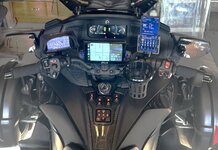

Thank you.I use a Garmin Zumo XT2 on my trips and works great with a Ram Mount...
Thank you for the information. I'm considering doing a similar setup.Before CAN-AM got Apple CarPlay to work I bought a Garmin Zumo XT GPS and a SlingMods docking station I bought from Spyder Extras.
The dock provides USB power so I rode with the Garmin mounted to the dock and plugged into it's USB power outlet.
Now that CarPlay is working, I've also added a QuadLock case to my iPhone, and a QuadLock handlebar mount.
I have a small travel case for the Garmin, so I still pack it and a USB power cable for it when I travel longer distances. I've been to one location in a deep canyon that had no cell phone signal, which is why I still carry the Garmin.
Because Apple CarPlay has worked fairly reliably for me I haven't really tried the BRP GO!/BRP Connect navigation process.
Also, I like that I can create routes on my desktop computer using the Google Maps application, and then send the routes to my iPhone.
The routes are then usable on my Spyder.
And if I'm attending an event with planned routes, I can import the GPX files they usually provide for the rides.
Thank you. The issue is that ACP is problematic. I've tried all of the solutions provided but still do not feel the application is reliable.With you having a 2025 bike, hook your phone to the USB in the upper compartment and use Carplay on the bike, using the GPS apps off your phone. I just came off an 8 day trip with my 2024 and it worked for me. I wear a half helmet, so no headphones, I just look down onto the screen to see when I need to make a turn.

Also, you should get weather with your XM subscription. That comes in handy.Most of the Motorcycle "Zumo" Garmin's will play MP3 files, which even included my old Zumo 550. The one thing about the Zumo 665, it has XM built into it too, so I get turn by turn directions and XM Classic Rewind. Granted, you have to mount an XM40 antenna...
View attachment 256426

And I thought I had the Starship Enterprise Spyder version but it’s you! Lol!I have a Garmin Zumo XT, Android Auto/CAP display, and a Pixel 8 Pro smart phone. I like using Google maps on the desk top and sending them to the phone. The Android Auto screen allows the use of gloves where the phone does not. Also, in hot weather, the phone will over heat. However, the Garmin and AA/CAP display does not.
View attachment 256354

I'd challenge that technology engineer. It does not have a native app for Apple macOS. Using it on an iPad just loads the iPhone version.I’ve been a Garmin user since way back when. Probably the first GPS that ever was produced. What I found is that the GPS is the best device for routing in my opinion. However, if you ride in a group, multiple people have even the same model of Garmin mounted on the Motorcycles, there is a possibility that they will create different routes and cause chaos. Be careful of this.
I was at club BRP this weekend, and spoke with one of the technology engineers behind their new display and BRP GO! Their on board navigation tool uses mapbox. He was trying to convince me that creating routes is as easy there as it is for the Garmin. I’m not convinced.
So I’ll keep my Starship Enterprise handlebars with a Garmin mounted on the right side, a CarPlay device in the center, and my phone on the left!

The Mapbox app CANNOT create routes. Period. it only does destinations and calculates its own routes. No allowance for shaping points or timing. Even the mobile versions of Google Maps, both Android and Apple cannot create routes. Google maps for web can but its useless on the road. At the moment only Garmin supports true route planning.I’ve been a Garmin user since way back when. Probably the first GPS that ever was produced. What I found is that the GPS is the best device for routing in my opinion. However, if you ride in a group, multiple people have even the same model of Garmin mounted on the Motorcycles, there is a possibility that they will create different routes and cause chaos. Be careful of this.
I was at club BRP this weekend, and spoke with one of the technology engineers behind their new display and BRP GO! Their on board navigation tool uses mapbox. He was trying to convince me that creating routes is as easy there as it is for the Garmin. I’m not convinced.
So I’ll keep my Starship Enterprise handlebars with a Garmin mounted on the right side, a CarPlay device in the center, and my phone on the left!
What I do with Apple Maps is I use the macOS version to create my routes. I then save a route by sending it to Apple Notes, choosing a name that starts with "Maps - ".The Mapbox app CANNOT create routes. Period. it only does destinations and calculates its own routes. No allowance for shaping points or timing. Even the mobile versions of Google Maps, both Android and Apple cannot create routes. Google maps for web can but its useless on the road. At the moment only Garmin supports true route planning.
If phone is your device of choice this will add another layer/device and battery drain on phone that already has several cons (single point of failure being #1).Get a Beeline. I've not tried one yet but plan to. Look up Beeline.
I agree with you about route planning. However, when you’re talking to an engineer, who is a millennial, don’t expect them to know how those of us who plan complicated routes really use their tools.I'd challenge that technology engineer. It does not have a native app for Apple macOS. Using it on an iPad just loads the iPhone version.
So the only Apple version is on an iPhone. I found using the iPhone app to be far from intuitive. It's seemingly designed for entering geographic coordinates rather than addresses or names of places. I cannot see BRP Go being anything like useful.
There is no real workflow available that takes routes prepared on a Mac with all the route selection criteria available under Apple Maps or Google Maps, then loading them into BRP Go. That would be practical but obviously not ideal. I cannot understand why BRP considers the app a practical way of planning routes wit such a restricted app. Most people plan routes offline with laptops or tablets and load them into their phones. Relying on a very feature poor app to enable this only on a phone is just not up to snuff.
I like to pre arrange trips on a MacBook or an iPad. The iPhone display is just too fiddly and constrained to plan routes. Apple Maps, Google Maps and a Garmin are far more intuitive than BRP Go I'm afraid.
Well there is this. There’s a big difference in engineering something and having a human interface professional view things from a user’s perspective.I agree with you about route planning. However, when you’re talking to an engineer, who is a millennial, don’t expect them to know how those of us who plan complicated routes really use their tools.

You failed to include all of the other BRP products in your assessment of what BRP GO does.I would suggest such a facility would be of the highest priority development, especially with the release of the 10.25” display. With all the best will in the world, and despite the Can Am engineer’s protestations that BRP Go is a decent product, the fact is it’s a completely underwhelming and largely impractical tool for what Can Am Spyder riders want and need.
I think this is the most important part of your response.Keep telling BRP what you want and perhaps they will listen!
As a network design engineer at a large nation wide bank, the bosses always said bring me a solution, not a problem. So maybe people need to suggest solutions to BRP and not complain about problems. That might get them to listen.I think this is the most important part of your response.
Complaining about something on a public forum won't solve anything.
Any complaints, concerns, and requests for changes should be directed to BRP.


