• There were many reasons for the change of the site software, the biggest was security. The age of the old software also meant no server updates for certain programs. There are many benefits to the new software, one of the biggest is the mobile functionality. Ill fix up some stuff in the coming days, we'll also try to get some of the old addons back or the data imported back into the site like the garage. To create a thread or to reply with a post is basically the same as it was in the prior software. The default style of the site is light colored, but i temporarily added a darker colored style, to change you can find a link at the bottom of the site.

Using an iPhone with BRP-Go Navigation - Review

amkrat

Active member
I've read a number of posts regarding the issues with android phones and the new BRP-Go navigation but not much about how things are going with those of us who use iPhones. So here goes:

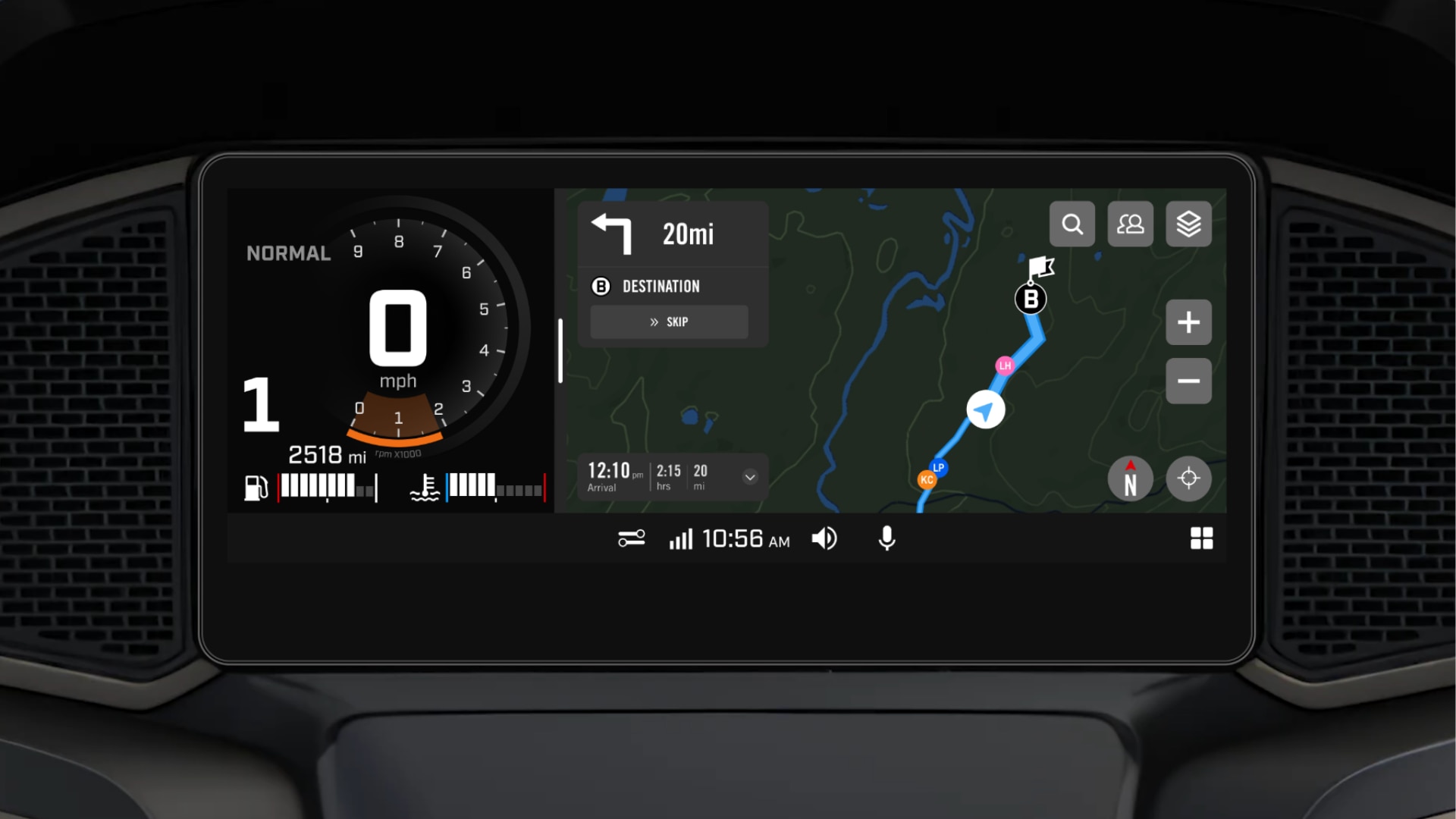
Installation was easy enough with no hiccups. When I got ready for my test ride today, I logged into my BRP-Go app and connected the phone to the USB cable. With ignition on, I went to the preferences applet, then down through General to Navigation, which I turned on. After selecting Navigation on the applet screen, the map displayed. I ran into a little trouble at that point because I also wanted to listen to music through my headset. I moved the BRP-Go app screen aside to find my music app and the map disappeared. Once I got the music playing, I went back to the BRP-Go app screen and it reconnected. Great so far.

I rode for about 50 miles or so and the navigation was working perfectly. I had also selected "record this ride" and it was leaving a nice black line in my wake. I stopped for about 30 minutes, taking my phone with me. When I returned and plugged the phone back in, everything appeared to be functioning as it should. After a short distance, I discovered that the screen was no longer scrolling to keep the vehicle icon centered on the map. It got to the edge of the screen and disappeared. I stopped to activate the touch screen, and slid the map over until the icon was once again present. So, the navigation was still recording my progress, but I was losing my position as soon as the icon reached the edge of the screen. I tried switching navigation off and back on, but that made no difference. I then found, in the lower right corner of the screen, the icon you use to change map orientation i.e. North up, Current direction up, or 3D. I cycled through it and got things working again. Of course, all of this had to be done while stopped, so it got to be a little frustrating.

I'll try it again tomorrow to see if this was just an anomaly. I hope it was. I think that Apple CarPlay will still be my navigation of choice though. It is just more convenient to select and use, especially since I ride with my helmet on and the headset connected for music and intercom.
Oh, by the way, the 'record my ride' feature gave a bunch of interesting data about the ride. Distance, average speed, time, etc.
 
Thank you for the update on how it works.

My first question about "navigation" is how do I tell it where I want to go, and possibly tell it what roads to use (ie avoid highways)?
 
Thank you for the update on how it works.

My first question about "navigation" is how do I tell it where I want to go, and possibly tell it what roads to use (ie avoid highways)?
Yes, dreadful isn't it. The CarPlay app has enough constraints on having to use a cable and Bluetooth for both the phone and the helmet.

I just use Apple or Google Maps on my phone and don't I link it to the display. I imagine Android users can do just the same with Google Maps.

Mind boggling in its level of difficulty to use and lack of features. The spent all that time and effort on what is quite a nice 10.25" display which is actually half decent to use with all its features, then the one thing you want to use it for is maps and directions, and you mess that function up so royally.

It's like the whole CarPlay thing was not thought out at all well, my 2017 Range Rover just needs a cable to run it and that's ancient technology.

It's like that part of the system was coded up by someone who had never thought out CarPlay on a motorcycle, and the BRP Go! maps app was given to the intern to port over as their summer assignment.

For a $34,000 machine, I must say that whole part is seriously disappointing and is less impressive than what you can get on cars for cheaper than that.

I doubt they do, but I do wish BRP could read these comments and figure out they need to do better for the price.
 
Yes, dreadful isn't it. The CarPlay app has enough constraints on having to use a cable and Bluetooth for both the phone and the helmet.
I'm sorry my question wasn't clear.

I have no problem with the iPhone having to be plugged into the USB port, nor with configuring Bluetooth for my phone and helmet headset.

I recently purchased a 2026 Honda Ridgeline, and the first thing the salesman helped me do was to Bluetooth connect my iPhone to the Ridgeline so Apple CarPlay would work correctly. There is a USB port in the dash, and it will provide power, but the navigation connection is via Bluetooth. My former Ridgeline, a 2023 model, required the iPhone to be plugged into the correct USB port on the dash for CarPlay to work.

And pairing your phone and helmet to your Spyder is a one time thing, unless you change phones, headsets, or Spyders. Which now I'm wondering if the Spyder remembers the Bluetooth settings if you have to change the battery?

If I'm planning a trip there are several different applications I could use on my desktop computer to plot the route. Most of them are drag-and-drop, in then I tell it start and stop points, and then after it creates it's route I can drag the route to use a different road. Personally I prefer to stay off the freeways on my Spyder, and prefer the state highways. After planning my route I can then export the route to a GPX file on my iPhone, which then becomes usable in CarPlay. I even attended a multiple day Spyder event with multiple pre-planned routes each day that the planners provided the GPX files. I just downloaded them from the website, synced them to my iPhone, and I was good to go.

It does not appear that the BRP GO! app supports planning a detailed route using a desktop computer and then having the route uploaded to the BRP GO! app. In fact, the BRP website says you use the BRP GO! to create an itinerary, then add waypoints by:

5. Select +STEP to add another waypoint to the itinerary

- You can tap the Search icon to choose from an official POI, a custom POI or type in a civic address

6. Press ADD TO ITINERARY

7.
Repeat steps 5 & 6 above until your desired itinerary is created
All in the BRP GO! app on your phone.

 
Yes, I prepare my itinerary on Apple Maps on my MacBook or iMac and the just share it to my iPhone so I don’t need a .GPX file, although it may use that behind the scenes.

I’ve also done it with Google Maps on a web browser so my iPhone Google Maps app picks it up.

I’ve abandoned CarPlay as even with cable+BT iPhone+BT helmet is a pain and it doesn’t always start up and sync everything and occasionally drops out if the helmet BT connection is lost.

For trip planning I’m used to Apple Maps and as I can push that to my iPhone it seems pretty well integrated and I’m used to the way Apple stuff works having been an Apple user exclusively since macOS X.0. That’s decades now, so somehow their interfaces are intuitive to me.

Now I’m still experimenting with BRP Go! but I found the app UI to be pretty awful. Personally I found it to be both sparse and not immediately intuitive. The lack of being able to prepare a route on a big screen where I can add my stops and select alternative routes visually and easily to make it difficult for these old eyes. Having a least a true iPad or tablet version instead of just an image of the phone version on a table would have been more than helpful. The ability to import a .GPX file would have been helpful.

Why BRP didn’t just license one of the many products available on the market that are clearly superior, I have no idea?

The Apple CarPlay unnecessarily requires too many connections and is therefore too inflexible and the BRP Go! support is pretty lame. This is from a company that obviously invested heavily in the 10.25” screen and the whole sophisticated vehicle dynamics software. I just don’t get it. It looks like they never beta tested it with regular riders.
 
Yes, I prepare my itinerary on Apple Maps on my MacBook or iMac and the just share it to my iPhone so I don’t need a .GPX file, although it may use that behind the scenes.

I’ve also done it with Google Maps on a web browser so my iPhone Google Maps app picks it up.

For trip planning I’m used to Apple Maps and as I can push that to my iPhone it seems pretty well integrated and I’m used to the way Apple stuff works having been an Apple user exclusively since macOS X.0. That’s decades now, so somehow their interfaces are intuitive to me.

Now I’m still experimenting with BRP Go! but I found the app UI to be pretty awful. Personally I found it to be both sparse and not immediately intuitive. The lack of being able to prepare a route on a big screen where I can add my stops and select alternative routes visually and easily to make it difficult for these old eyes. Having a least a true iPad or tablet version instead of just an image of the phone version on a table would have been more than helpful. The ability to import a .GPX file would have been helpful.
Okay, so what I see here is that you use either Apple Maps or Google Maps to load a route to your iPhone, and then use the maps directly on the iPhone for navigation while riding?

And it appears BRP GO! is as horrible as I thought it was.

As for the connection/bluetooth/cable issues yes, it's annoying, but it works for me. The biggest concern for me is remembering to take the charging cable for my helmet headset when I go on longer trips. :D

I do have to admit I like my new 2026 Honda Ridgeline and how they implemented Apple CarPlay (and Android Auto from what I've been told).
You bluetooth pair your phone to the Ridgeline...and then drive! No cables required. There's even a charging pad built into the dash that charges your phone when you just place it there without needing a cable.
 
Yes. That's how I do it. I don't couple anything to the bike except I installed a USB charging, with no data, cable from the Spyder to the phone mount so my iPhone keeps a charge.

From Amazon I bought these:

[4-Piece] Cozy USB Caps for USB C Cable - Tether/Cap Provides Dust and Oxidation Protection, Projection Adapter Cover, Protects During Travel, Portable, Designed by Cozy (Black)​

and this:

Treedix USB Cable Tester Board USB Cable Checker Data Wire with Acrylic Case Charging Test Data Line Type-C Micro Type A Type B​

The Treedix USB cable tester allows me to quickly tell what each of the seemingly hundreds of USB cables I have accumulated is of which type and data rate. I then label the cables so I know at a glance, which is which.

I have an older 2017 Range Rover and CarPlay works with just a USB cable, which is acceptable for the over a decade old JLR system. Why Ca Am couldn't have at least done this. I know a cable to connect is better on a bike because of the increased un-shielded electrical noise.

I forgot to pack my wife's iWatch charger this last trip to southern Utah. I was in big trouble as finding a cable in Escalante UT was impossible. It's probably 4 or 5 hours to a Walmart. I won't do that again. I actually remembered the helmet cables which is good because they aren't USB C on my SRL2 units.

I've decided, after all these years, I'm going to buy a cheap wash bag from Amazon and then fill it permanently prepacked chargers and labelled cables to cover our iPhones (hers is a lightning connector), her iWatch, both of our tablets, both helmets, cameras, her Nintendo Switch 2, and a couple of spare USB A and USB C to USB C cables.

This way, whenever we go anywhere I can just grab the bag and not worry about remembering to pack everything correctly. I probably have 90% of the cables and just need his and her chargers with 3 USB-C and 3 USB-A ports, making sure one port is 30W for her Switch.

Too many electronics I know, but I'm just in charge of making sure I pack the equipment. This last time I failed in one only aspect, the iWatch, but "failure is not an option" as Gene Kranz said.
 
Back
Top