• There were many reasons for the change of the site software, the biggest was security. The age of the old software also meant no server updates for certain programs. There are many benefits to the new software, one of the biggest is the mobile functionality. Ill fix up some stuff in the coming days, we'll also try to get some of the old addons back or the data imported back into the site like the garage. To create a thread or to reply with a post is basically the same as it was in the prior software. The default style of the site is light colored, but i temporarily added a darker colored style, to change you can find a link at the bottom of the site.

Today I tried navigation via BRP Go (2024+)...

It's a USB 2.0 port, which by definition is 5V and 500mA.

I'm sure at 500ma my phone would've lost charge while navigating with the display screen on for over 2 hours, yet it kept the charge at 80%.

If it's a USB 2.0, then 0.5A is the standard for computers (launched more than 25 years ago), but it has been revised for chargers to support charging larger batteries. In fact, I believe you can deliver whatever you need as long it's 5V, cable and whatever is in the other end will dictate the current pulled.
 
I'm sure at 500ma my phone would've lost charge while navigating with the display screen on for over 2 hours, yet it kept the charge at 80%.

If it's a USB 2.0, then 0.5A is the standard for computers (launched more than 25 years ago), but it has been revised for chargers to support charging larger batteries. In fact, I believe you can deliver whatever you need as long it's 5V, cable and whatever is in the other end will dictate the current pulled.
Google thinks the USB 2.0 standard has not changed.

I did find one reference to a change to an embedded USB 2.0 (eUSB2V2) dated 09/27/2024 that is described as:
This eUSB2 Version 2.0 (eUSB2V2) document defines a performance enhancement to the USB industry-standard, USB 2.0 and eUSB2 specifications. The USB 2.0 specification describes the protocol definition, types of transactions, and bus management required to design and build systems and peripherals that are compliant with this specification. eUSB2V2 is primarily a performance enhancement to eUSB2 native mode to provide more bandwidth for peripherals, such as embedded cameras, by adding significantly higher data rates to USB 2.0, while maintaining a low-voltage electrical interface.

So the data transfer rate was increased, but not the power.

 
Google thinks the USB 2.0 standard has not changed.

I did find one reference to a change to an embedded USB 2.0 (eUSB2V2) dated 09/27/2024 that is described as:


So the data transfer rate was increased, but not the power.

Most USB 2.0, or 2.1 for that matter, devices as found in a computer on a chip, or low cost USB specific chips, tend to have effective data rates way below that of the rated specification.

I expect the data rate on the 10.25" cluster in no doubt quick enough to run Apply CarPlay apps and that's about it. Even if the hardware could go closer to the specification, the software overhead makes the effective data rate much lower.

That's my experience with systems resembling the capabilities of the Spyder's embedded display system.
 
When I bought my Spyder CAN-AM was still trying to get Apple Carplay to work correctly.
Once they released the software update, I immediately downloaded and installed it on my Spyder using my home WiFi network.

And then the issues started.

I am an Apple FanBoy, and had an iPhone SE at the time, which used the infamous Lightning connector.
So I tried to get my iPhone to connect.
Didn't work.
Went digging through my stuff and found a few more Apple Lightning cables, and started trying them.
I think I ended up testing 7 or 8 different Apple Lightning cables. If I remember correctly I found one that always worked, and one that worked most of the time. The other cables I tossed.

I now have an iPhone SE 2nd Gen, which uses a USB C cable. I'm using a braided Belkin cable USB C on my Spyder, and a 6" cheap no-name braided cable USB C cable in my Honda Ridgeline, which also supports Apple Carplay.

So the quality of the cable is important. Also, some manufacturers differentiate between data cables and charging cables. You need a "data" cable.


As for planning and saving trips, Google found this as the first step:
  • Open the RIDES icon/tab in the app and select CREATE ITINERARY.
So apparently you can create (and save?) an Itinerary for later use.

After BRP kept telling me to use a USB cable with having the phone bluetooth off never worked, I experimented on my own and discovered that when bluetooth is turned on and connected to the Spyder with the headset paired to the Spyder, it will connect every time. After they are connected, I plug in the USB cable and Apple CarPlay works every time.
 
Google thinks the USB 2.0 standard has not changed.

I did find one reference to a change to an embedded USB 2.0 (eUSB2V2) dated 09/27/2024 that is described as:


So the data transfer rate was increased, but not the power.


Well, I'll say it again, I'm convinced there's no way my phone would have kept the state of charge during that +2h trip at 0.5A... So, I'm about sure charging power should be above 0.5A.

And power was actually increased to 1.5A with the introduction of BC1.2 (2010, 4 years before USB-C) to support battery charging.

 
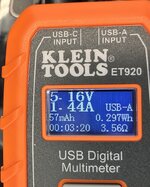
Klein Tools ET 920 meter results for a 2024 Spyder RT Sea2Sky and iPhone SE 2nd Gen connected to the USB port in the glove box.
iPhone was connected to the meter using the same Belkin braided cable that I've been using for CarPlay on mySpyder.

The time in the lower left of the ET 920's screen is how long it had been connected.
I started the Spyder's engine before testing, and let it run for a few minutes to make sure the engine was warmed up and running at idle.

Connection: iPhone (USB C) --> Belkin Cable (USB C to USB A) --> ET 920 (USB A connections) --> Spyder front USB A port

USBMeter.jpeg

(click for larger image)

Online ET 920 User Guide:

 
Last edited:
Back
Top