
• There were many reasons for the change of the site software, the biggest was security. The age of the old software also meant no server updates for certain programs. There are many benefits to the new software, one of the biggest is the mobile functionality. Ill fix up some stuff in the coming days, we'll also try to get some of the old addons back or the data imported back into the site like the garage. To create a thread or to reply with a post is basically the same as it was in the prior software. The default style of the site is light colored, but i temporarily added a darker colored style, to change you can find a link at the bottom of the site.

Today I tried navigation via BRP Go (2024+)...

MakoShark2

Active member
Today I tried multipoint navigation via BRP Go, and I must say that for me it’s not bad at all. I’m convinced that this new display is the right way forward.

The app is intuitive, creating a route is relatively simple and quick, and the connection to the Spyder is fast. You open the app, choose a previously created route, connect to the Spyder, and go...

The new display is large and the format is ideal: on the left, in one‑third of the screen, you have the gauges with all the necessary information, and on the remaining two‑thirds you get a well‑designed navigation screen. The instructions are clear, and the screen size makes it easy to see the road ahead - I didn’t even miss voice guidance.
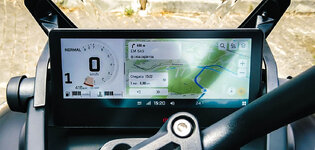
brpgo.jpg

During the first hour it worked without any connection drop, then I had about three or four cuts of no more than one second each. I’m unsure whether the cable is to blame (I'll be getting a new braided one) or the fact that the phone was near the end with about 10% battery… Speaking of that, the USB port doesn’t seem to have enough power to navigate and charge the phone at the same time (at least, not my Pixel phone). Does anyone know the power output of the data USB port? I started with more than 50% battery and ended with 10%.

I hope some BRP technician reads this, but for me, only two things are missing before I start leaving the Garmin Zumo at home:
  1. the ability to import routes (GPX files, for example) into the app - and that should be easy to implement;
  2. a wireless connection (Wi‑Fi, for example) between the phone and the Spyder instead of USB cable.

So what's your experience?

Best regards,
Daniel Santos.
 
Today I tried multipoint navigation via BRP Go, and I must say that for me it’s not bad at all. I’m convinced that this new display is the right way forward.

The app is intuitive, creating a route is relatively simple and quick, and the connection to the Spyder is fast. You open the app, choose a previously created route, connect to the Spyder, and go...

What app did you use to create the route for BRP GO?

During the first hour it worked without any connection drop, then I had about three or four cuts of no more than one second each. I’m unsure whether the cable is to blame (I'll be getting a new braided one) or the fact that the phone was near the end with about 10% battery… Speaking of that, the USB port doesn’t seem to have enough power to navigate and charge the phone at the same time (at least my Pixel phone). Does anyone know the power output of the data USB port? I started with more than 50% battery and ended with 10%.

I hope some BRP technician reads this, but for me only two things are missing before I start leaving the Garmin Zumo at home:
  1. the ability to import routes (GPX files, for example) into the app — and that should be easy to implement;
  2. a wireless connection (Wi‑Fi, for example) between the phone and the Spyder instead of USB cable.

I believe it's a USB 2.0 port, which means 2.1 amps at 5 volts.
The question is how much power your phone uses while using the GPS/navigation features of the phone.

I haven't had any problems with power for my iPhone SE.
Google says Pixel phones tend to use more power than an iPhone.
 
For me, the lack of voice guidance is unacceptable. My Innovv system with Android Auto allows me to use Waze, and other apps. Today, riding home from Maggie Valley, amongst all the other warnings, Waze saved me from hitting a truck tire cap that was in the middle of the lane. It wasn't visible on the map.
 
So I've been thinking about BRP GO! some more... and maybe obsessing about it a little. A bit of time with Google found some interesting information.

BRP GO! is the app that runs on your phone to connect your phone to the 10.25" display of your Spyder or Canyon.
BRP Connect is the software that runs on your Spyder or Canyon that BRP GO! connects to.

And what is interesting is that after your phone is connected to your bike through the BRP GO/Connect process, you can then run Sygic GPS Navigation or the REVER navigation app on your phone and it will work on your Spyder's display.

Both Sygic and REVER support GPX file imports.

I have been able to create GPX files using the Google Maps application on my home computer (not the maps.google.com website), and then transfer those GPX files to my phone. I've also attended a couple of Spyder events where specific routes were planned by the organizers and shared with attendees as GPX files.
 
I used the BRP GO app last week to ride the Claw of the Dragon. Agreed that it's not to hard to set up a route via waypoints. However riding the ups and downs of the road I lost cell signal numerous times. The app seemed to rememer what it was doing when my phone reconnected to cell signal but only for a short time. Then the app chose to forget the last remaining way points and tried to reroute to the end waypoint. I don't find that relying on cell signal for navigating is the way to go.

I'm going to try it out again tomorrow while riding Skyline Drive in Virginia and see what happens. I have a feeling I'll be springing for a Garmin in the near future.
 
So I've been thinking about BRP GO! some more... and maybe obsessing about it a little. A bit of time with Google found some interesting information.

BRP GO! is the app that runs on your phone to connect your phone to the 10.25" display of your Spyder or Canyon.
BRP Connect is the software that runs on your Spyder or Canyon that BRP GO! connects to.

And what is interesting is that after your phone is connected to your bike through the BRP GO/Connect process, you can then run Sygic GPS Navigation or the REVER navigation app on your phone and it will work on your Spyder's display.

Both Sygic and REVER support GPX file imports.

I have been able to create GPX files using the Google Maps application on my home computer (not the maps.google.com website), and then transfer those GPX files to my phone. I've also attended a couple of Spyder events where specific routes were planned by the organizers and shared with attendees as GPX files.

I did know that for the 7.8 inch display that beside BRP Go! some third party apps were supported like: Dash Radio, Fobo Bike, Cardo Connect, Genius Maps, Sygic, Rever, AccuWeather.

I was not aware that those worked also on the new 10.25 inch display, I'll have to check this.

Thanks for the info.

What app did you use to create the route for BRP GO?

Created the route directly in BRP Go, 17 points but it was quite easy to do.

I am just the opposite, I always turn off that nagging voice.

Likewise here.
 
I did know that for the 7.8 inch display that beside BRP Go! some third party apps were supported like: Dash Radio, Fobo Bike, Cardo Connect, Genius Maps, Sygic, Rever, AccuWeather.

I was not aware that those worked also on the new 10.25 inch display, I'll have to check this.

Thanks for the info.


Created the route directly in BRP Go, 17 points but it was quite easy to do.


Likewise here.
On my phone, there is no way to select an alternate navigation app, like Sygic, when connected via BRPGo!. I think google is mixing the old BRPConnect and BRPGo. So far no one has posted running anything but the poor navigation software BRP included in the app.
 
On my phone, there is no way to select an alternate navigation app, like Sygic, when connected via BRPGo!. I think google is mixing the old BRPConnect and BRPGo. So far no one has posted running anything but the poor navigation software BRP included in the app.
For grins, I just tried it again on my bike. When connected, there is no selection available on the Spyder that allows selection of alternate navigation. The system boots immediately to the BRPGo Nav app, period, once connected to phone. I tried to outsmart it, and went on my phone and pulled up Sygic directly on phone.

On 1st try, the bike shows a Sygic splash screen, but the phone had an error requiring a Sygic restart. I tried restart several times to no avail. I finally uninstalled and reinstalled Sygic on my phone... even though I was running most current version. After the reinstall, I can connect thru BRPGo, with bike showing the BRP app. With that, I can then use the phone to manually switch apps (not through BRP Go) and bring up Sygic. I did not ride with it, so not sure about disconnects etc, but I was able to get the Sygic app to show on the bike's screen. It seems to function correctly.

So it seems Sygic may be a possibility. And for those that don't know, Sygic runs offline maps, so you download them once and then do not need cell signal for it to work. It does read GPX files as well.
 
Last edited:
So it seems Sygic may be a possibility. And for those that don't know, Sygic runs offline maps, so you download them once and then do not need cell signal for it to work. It does read GPX files as well.

That's good news, I'll have to try this myself... And maybe other apps which work with the 7.8 inch display will also work with the 10.25 inch.
 
I am just the opposite, I always turn off that nagging voice.
Sometimes comical especially some Louisiana names/ pronunciations & the ever so immediate “turn L” when there is absolutely no nothing resembling a drive much less intersection to attempt said L (oddly does seem more L than R for that-seem -not verified)
 
Ok. So I spent a couple of days with BRP Go riding The Skyline Drive in Virginia. Had the same experience as before with losing cell service. For the most part, it would stay on track when it reconnected.

But I found that over 2 days of stopping to take pictures, the constant connecting and disconnecting my phone was a pain in the rear (Not BRP Go's fault). I also could have used a spare phone to leave connected, I suppose.

When we got to town with consistent cell service, the app worked flawlessly for navigation. I still think I will get a Garmin for future back roads navigation, but I think the BRP Go app has a place for in and around town rides.
 
Today I tried multipoint navigation via BRP Go, and I must say that for me it’s not bad at all. I’m convinced that this new display is the right way forward.

The app is intuitive, creating a route is relatively simple and quick, and the connection to the Spyder is fast. You open the app, choose a previously created route, connect to the Spyder, and go...

The new display is large and the format is ideal: on the left, in one‑third of the screen, you have the gauges with all the necessary information, and on the remaining two‑thirds you get a well‑designed navigation screen. The instructions are clear, and the screen size makes it easy to see the road ahead - I didn’t even miss voice guidance.

View attachment 255844

During the first hour it worked without any connection drop, then I had about three or four cuts of no more than one second each. I’m unsure whether the cable is to blame (I'll be getting a new braided one) or the fact that the phone was near the end with about 10% battery… Speaking of that, the USB port doesn’t seem to have enough power to navigate and charge the phone at the same time (at least, not my Pixel phone). Does anyone know the power output of the data USB port? I started with more than 50% battery and ended with 10%.

I hope some BRP technician reads this, but for me, only two things are missing before I start leaving the Garmin Zumo at home:
  1. the ability to import routes (GPX files, for example) into the app - and that should be easy to implement;
  2. a wireless connection (Wi‑Fi, for example) between the phone and the Spyder instead of USB cable.

So what's your experience?

Best regards,
Daniel Santos.
Correction, you cannot chose a ROUTE, only a destination. BRP Go does not support routes. One of its biggest downfalls making it useless for planning motorcycle rides.

The USB port is limited to 500ma and will not charge a phone while using navigation, simply not enough power.
 
Correction, you cannot chose a ROUTE, only a destination. BRP Go does not support routes. One of its biggest downfalls making it useless for planning motorcycle rides.

The USB port is limited to 500ma and will not charge a phone while using navigation, simply not enough power.

If you mean shape points, you're right... Only via points available, but that's enough for me... I've followed an itinerary with 17 via points and it worked really well.

OK, only 500ma is really lame, that would explain why the battery was draining... So supporting a wireless connection would perfect.
 
OK, so I may just be stupid at this point, but I'll ask anyway...

I finally downloaded the app (Android - Pixel 7 Pro if it matters), created the account and added my Spyder by VIN (that actually worked). My software is current and BRP Go has been selected as the navigation software. So far so good. However, the bike will not see the phone when it's plugged in, and yes, I even have a stupid and functionally useless 6" cable for testing. For the life of me, I can't figure out how to get the bike to see the phone. I added a Bluetooth connection just in case, and it appears that the phone is sync'd to the bike.

Additionally, unless I'm missing something else (and I hope I am), I don't see any way to save a trip for later use. It appears to me that you plot your trip, plug in the phone and take off. If you close the app, the trip goes away!

I hope I'm missing something, or a lot of somethings. Fortunately, my Garmin Zumo 665 still works just like it should.

jdg
 
Last edited:
OK, so I may just be stupid at this point, but I'll ask anyway...

I finally downloaded the app (Android - Pixel 7 Pro if it matters), created the account and added my Spyder by VIN (that actually worked). My software is current and BRP Go has been selected as the navigation software. So far so good. However, the bike will not see the phone when it's plugged in, and yes, I even have a stupid and functionally useless 6" cable for testing. For the life of me, I can't figure out how to get the bike to see the phone. I added a Bluetooth connection just in case, and it appears that the phone is sync'd to the bike.

Additionally, unless I'm missing something else (and I hope I am), I don't see any way to save a trip for later use. It appears to me that you plot your trip, plug in the phone and take off. If you close the app, the trip goes away!

I hope I'm missing something, or a lot of somethings. Fortunately, my Garmin Zumo 665 still works just like it should.

jdg

Just checking, but did you/have you updated the Spyder display to the latest available version? Previous versions will not interact with BRP Go, only Apple Carplay.
Also, make sure after that you have enabled in the Spyder settings navigation to BRP Go and not left it set on Apple Carplay.

Correct, that's how it works.
 
When I bought my Spyder CAN-AM was still trying to get Apple Carplay to work correctly.
Once they released the software update, I immediately downloaded and installed it on my Spyder using my home WiFi network.

And then the issues started.

I am an Apple FanBoy, and had an iPhone SE at the time, which used the infamous Lightning connector.
So I tried to get my iPhone to connect.
Didn't work.
Went digging through my stuff and found a few more Apple Lightning cables, and started trying them.
I think I ended up testing 7 or 8 different Apple Lightning cables. If I remember correctly I found one that always worked, and one that worked most of the time. The other cables I tossed.

I now have an iPhone SE 2nd Gen, which uses a USB C cable. I'm using a braided Belkin cable USB C on my Spyder, and a 6" cheap no-name braided cable USB C cable in my Honda Ridgeline, which also supports Apple Carplay.

So the quality of the cable is important. Also, some manufacturers differentiate between data cables and charging cables. You need a "data" cable.


As for planning and saving trips, Google found this as the first step:
  • Open the RIDES icon/tab in the app and select CREATE ITINERARY.
So apparently you can create (and save?) an Itinerary for later use.
 
Just checking, but did you/have you updated the Spyder display to the latest available version? Previous versions will not interact with BRP Go, only Apple Carplay.
Also, make sure after that you have enabled in the Spyder settings navigation to BRP Go and not left it set on Apple Carplay.

Correct, that's how it works.
Yep, I have the latest software, updated last week by the dealer while I was there for the 3000 mile break-in service. Navi is set to BRP Go. Everything looks right but the bike says it can't see the app.

As for planning and saving trips, Google found this as the first step:
  • Open the RIDES icon/tab in the app and select CREATE ITINERARY.
You can create but there is no option to save it for later, and if you close the app (doG forbid you'd eat lunch and shut the phone off) your itinerary goes away.

Honestly, at this point, I see no reason to have my phone sync'd to the bike at all, and I'll probably delete the BRP Go app as it seems to be really useless for my needs/wants.
jdg
 
Google says:

1. Pre-planned Routes
You can map out your entire ride:
    • Go to the Rides tab and select the starting point (current location, a point on the map, or an official POI like a gas station or restaurant).
    • Add stops by long-pressing on the map, and let the app automatically calculate the shortest route.
    • Save and name the route, then access it later in the "Upcoming" tab under Rides
 
Back
Top