• There were many reasons for the change of the site software, the biggest was security. The age of the old software also meant no server updates for certain programs. There are many benefits to the new software, one of the biggest is the mobile functionality. Ill fix up some stuff in the coming days, we'll also try to get some of the old addons back or the data imported back into the site like the garage. To create a thread or to reply with a post is basically the same as it was in the prior software. The default style of the site is light colored, but i temporarily added a darker colored style, to change you can find a link at the bottom of the site.

Looking for a good GPS - Touring, no off road. Considering Garmin Zumo XT - thoughts?

So I tried to plot the route I am taking to my sister's house for Thanksgiving, and Google Maps gave me lots of problems.

<<<snip>>>

And the route I plotted on my computer included drag and drop changes to avoid the downtown areas of Nashville TN, Memphis TN, and Dallas TX.

<<<snip>>>

So I'm frustrated and confused, as I know I've used Google Maps before.
Time for more research...

So a bit more time with Google trying to figure this out and I found out that it's working exactly as Google designed it to work.
It is basically (re)plotting the route using what it knows about current road conditions at the time the route is being plotted.

Which could be entirely different tomorrow or even in an hour from now, based on real time road conditions according to Google.

And of course there's a workaround... which requires more work. :p

And this comment from @jcthorne is the answer:

Try it again with a longer distance, and multiple stops like gas stops and lunch along the way and ending up at a hotel.

So every time I want the route to vary from a "default" route, I need to add a stop so that it won't calculate a different route.

Another term used is to add a waypoint.

And yeah, that's going to take some time...
 
I have fought the route planning battle with several different Route Planners and GPS devices on multiple different motorcycle brands.
They all are finicky and time consuming, I found I spent more time trying to reconcile where I am with the planned route than enjoying the ride.
The last two touring seasons, about 19000 miles, we came up on a solution that works for us.
Each day starts with a hand written list of the roads we intend to ride that day. If we deviate from the list because a stop or different route presents itself, we don't care. We do what we want without concerning ourselves with a route.
Some time during the day, we figure out where we want to stop that night and plug in an address to our phone or the bike's GPS if it has one. We then go on our merry way and enjoy the ride. We don't concern ourselves with the routing since just putting in an ending address, the mapping software will recalculate the route as we go. Eventually we follow the route on the unit to find the hotel, or attraction.
I'm all for tech that enhances my life, but sometimes the tech was never really designed for how we wish it worked.
Next year will be our first touring season on the Spyder. I use an Android phone and we plan on using it just as I described above. I considered buying an XT2. But so far I just plug in an ending address on my phone, stick it back in my pocket and pick up the turn by turn audio on my Cardo com when I'm ready to head to the address. I might spring for a handlebar mount at some point, but that's way less expensive than a $700 GPS that does exactly the same thing as the phone I already own.
Works for us, YMMV.
 
I have the Garmin XT2. Works well, nice big screen & easy - enough to see in daylight. Paired well with my helmet coms for verbal route instructions. Doesn't like charging via USB from my PC (probably the PC's fault) but a normal phone charger works well.

Communication using the Tread app on your phone is OK, but I'm old school... I like a wired connection better. I prefer mapping on a decent size screen rather than on a phone app and I use Google MyMaps these days.

Map the route in MyMaps -> export it in .kml format -> email the .kml to myself -> open the email on my phone & save the .kml -> find the .kml on the phone & open it with the Tread app. -> sync the imported route to the XT2, it'll import as a 'track' -> open the imported track, and convert it to a route using the XT2's tools.
Doesn't like charging via USB from my PC

I've found over several Garmin GPS units, that they like the Garmin USB cable best, and often don't work well with others.
 
Looking for a good GPS. Touring, no off road. Considering the Garmin ZUMO XT. What are your thoughts?
I have it and it is great for my UTV off road as well as on my S2S.
It shows every road, trail, and highway, whether off or on road.
 
So I tried to plot the route I am taking to my sister's house for Thanksgiving, and Google Maps gave me lots of problems. I could create the route using the Google Maps application on my computer, and then try to send it to my iPhone, at which point it only said I could email a copy of it to my email address.

And the route I plotted on my computer included drag and drop changes to avoid the downtown areas of Nashville TN, Memphis TN, and Dallas TX.

A bit of poking around, and it turns out there was an update to the Google Maps App for iPhone that I had yet to download and install. I did that, and it still was complaining. There is a requirement that you be logged into both places with the same Google account, so I logged out of both, logged in again, and repeated the steps.

And it sent the route to the phone, but NONE of the individual changes to the route.

In fact, it plotted a completely different route than the original baseline route, and without any of my changes.

So I'm frustrated and confused, as I know I've used Google Maps before.
Time for more research...

This exact same thing happened to me. One would think that when you carefully plan the route on google maps and then send it to your phone, it would remember all of the dragged changes. But nope, it defaults to the quickest route, even when logged in to the same account on both the computer and the phone.

So a bit more time with Google trying to figure this out and I found out that it's working exactly as Google designed it to work.
It is basically (re)plotting the route using what it knows about current road conditions at the time the route is being plotted.

Which could be entirely different tomorrow or even in an hour from now, based on real time road conditions according to Google.

And of course there's a workaround... which requires more work. :p

And this comment from @jcthorne is the answer:


So every time I want the route to vary from a "default" route, I need to add a stop so that it won't calculate a different route.

Another term used is to add a waypoint.

And yeah, that's going to take some time...
But if just choosing a curvy road, there isn't always a waypoint to select. This is frustrating.
 
New 2024 Spyder RT Limited rider - dealing with the “maps” on display adventure. Installed Carda Freecom 4X to both our helmets, Bluetooth to Freecoms only from Spyder with iPhone plugged in to glove box does work great for Carplay. However, wife’s android phone no dice. I could use Waze and plan routes but she can’t. Tried a Carplay emulator and Can Am’s software defeats that option. Thinking about the XT2 Garmin when a motorcycle friend suggested a Beeline Moto2.
https://beeline.co/pages/beeline-moto
This looks very interesting and the new app allows voice notifications without buying the monthly “extra features” subscription. Plan your curvy road route on the phone app, put phone away, check display for next turn with audio cues if your helmet allows, and arrive with less distractions.
 
But if just choosing a curvy road, there isn't always a waypoint to select. This is frustrating.
I opened the Google Maps on my computer, and told it to plot a route to a destination that was located just off Interstate 40 near where I live.
The default route it plotted was the fastest route from my home to I-40, and then I-40 to the destination.

So I dragged and dropped a twistier route to the destination, completely avoiding I-40.
And then at several places along the new route, sometimes after a turn and sometimes nowhere in particular, I right clicked on the route, which popped up a menu with several options.

One of the listed options in the popup menu was "Add a destination" which added a small dot to the route, and added that location to the route list in the upper left corner of the map.

I sent the directions to my iPhone.
And yes, the twisty route is what appeared on my iPhone, along with all places I had added a "destination" showing as stops along the route.
 
A number of places, Cycle Gear and Amazon to name two that I've seen, are running early black Friday deals on the Garmin XT2 for $450. I don't know if it can get much better than that. Normal price is $600. A couple of times a year, the sale price is usually $500. Surprisingly, the XT is still going for $500, so you can now get the XT2 for less than an XT.

Yes, it could be an indication that Garmin is getting ready to release a new version so they are trying to reduce stock. But if so, the new one will probably have a price point well above $600 which is more than I'm willing to pay and I'm happy with a -1 generation.

I think it is time to replace my Zumo 396 and have a better companion/backup to the mischievous Apple CarPlay.
 
I don’t think any one device is gonna cut it. I had an experience: Poker run destination; street address provided; programmed & middle of nowhere, incorrect; reprogrammed, double checking info is correct; nope, no improvement. Programmed a second device; same result & aggravated; the destination happened to be an airport cafe. Used google maps satellite view to look (not for the address) for any obvious airport in general area; dropped a pin & went; some fun miles wandering in that nowhere made up for the aggravation, & the cafe had good food too. I later discovered multiple errors with large sections of E Texas (average was 6 miles or more off the location vs the actual!)
Devices: Garmin Zumo 660, TomTom XL, & an iPhone.


IMG_2702.jpeg
 
I live in NC and often end up where there is no cell service or very weak. I use the Garman XT2 so that I do not have to worry about cell service when I need to use a map. More times than not, I just ride and not worry about a map while riding.
 
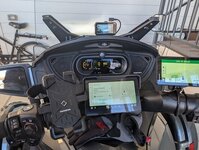
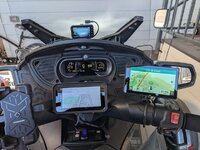
I have a Garmin XP, however routes are hard to plan on it. So I use Google Maps on desk top to plan and send route to Pixel 8 Pro smart phone. Recently added a Driauto Carplay/Android Auto 7" display. I lead SxS groups with GAIA GPS and lead trike groups. Wrong turns are called EXPLORING!

PXL_20251204_172525309.jpg
 
I live in NC and often end up where there is no cell service or very weak. I use the Garman XT2 so that I do not have to worry about cell service when I need to use a map. More times than not, I just ride and not worry about a map while riding.
Google maps allows for downloading off line maps.
 
Just joining the Spyder family (purchased a 2024 RTL today) and I am planning to add my Garmin Zumo 665 w/XM to the bike. I'm hoping the aux output cable can be wired into the RTL infotainment system so I can pair my Sena to the Spyder and get my XM radio through the Spyder's speakers.

Thoughts?

jdg
 
There is no provision to wire in an audio device like your Garmin on the 24 and up Spyders. They are bluetooth ONLY for audio I/O.
 
JC is right in the bull's-eye about BaseCamp. It is still a very functional, effective route creation tool, but is one with a steep learning curve.
In my travails with it I've found two very good sources for learning the software. The first is the New England Riders tutorial on learning BaseCamp:

https://www.newenglandriders.org/learn-basecamp/

and the second is a gent in FL - Ez Moto Tim, who has an excellent series of video tutorials on Youtube:

https://ezmototim.com/basecamptutorials/

Tim really knows his stuff.

My touring partner and I live about a hundred miles apart and when I plan our major annual excursion, we meet somewhere half way and I download all our routes to his Zumo XT, and it's just as simple as downloading them to my Zumo 590.
Just want to say I agree with you regarding Ez Moto Tim. Best resource I have found.
 
I have a Garmin XP, however routes are hard to plan on it. So I use Google Maps on desk top to plan and send route to Pixel 8 Pro smart phone. Recently added a Driauto Carplay/Android Auto 7" display. I lead SxS groups with GAIA GPS and lead trike groups. Wrong turns are called EXPLORING!

View attachment 252753
The Driauto 7" when back to Amazon and I installed a 6" YZW MT600 that does not interfere with the Zumo XT.

YZW.jpg
 
I'll chip in here, if I may. Newbie member - I don't even get my Spyder until tomorrow morning, but I do know quite a lot about the Zumos, and currently have the XT1 and XT2. (The XT1 is actually called the XT, but I tend to add the '1' so that people know it isn't a Typo.

The XT1 and XT2 both have issues with GPX route files. The XT2 particularly so. But over at zumouserforums.co.uk, we have solutions for most of these. Personally I consider the Zumo 590 to be the most predictable in terms of what it will do - for example when you deviate fromt he plotted route. I do not use the 590 or 595 much these days - except to answer queries. It is the XT2 that was the one fitted to my motorcycle - until I have that to my brother in order to clear space for the Spyder. The XT2 will be mounted (when I find out how) to my new ride.

The XT2 works with an app called Tread on your phone which synchs your routes, tracks and waypoints between cloud storage - at your account at Explore.gramin.com. The XT1 does something similar via an app on your phone called 'Drive'. It seems to be this particular feature that causes problems with the XT2: It nearly always changes the name and the location of any point that you have plotted to form your route - to the extent that if you have placed 'Shaping Points' on roads specifically because you want to ride that road, the XT2 will very often move them onto a nearby faster road. Which makes a complete mess of your carefully planned route. The same happens with 'Via Points'.
Another issue with the XT1 and XT2 is that if you use gpx files for your routes, the Zumo has to import them and build a valid route from what it finds. In doing so, the XT2 in particular applies a sort of fuzzy logic to you points and 'improves them' to locations that it alread knows about. This is when it seems to move and rename the locations. It then builds a filename.trip which is stored in a hidden System folder, with all of these new route points.

But it also flags the route as being 'imported', rather than having been created and saved by the Zumo's own Route Planner App. That is significant because if you have to deviate from the route, and the route is recalculated - particularly if you have had to 'skip' a route point that you cna no longer visit - the XT1 and XT2 seem to recalculate the route using a different algorithm form the one that it uses if the route was 'saved' - ie created on the XT1/XT2 itself. What it does is head for the nearest point on the route 'ahead' rather than calculating a route to the next plotted route point (via or shaping). That is significant, because if it decides that the closest point is behind you, it will want to send you back. You ignore it, and the route it has just calculated starts at where it last asked you to go back. So it gets stuck in a never ending loop. If U turns are allowed, this is very obvious. If they are not, it still does the same thing but it has to use other techniques to get you to go back.

I discovered this behaviour first on the XT1 and came up with the term RUT to descibe it. Like being stuck in a rut from which it can never escape. But Repeated U Turns is often one of the symptoms.

But these problems are all manageable.

On the XT2 - RUT behaviour can be prevented simply by using the copy facility to make a copy of the route. Use the copy instead of the original.

The other issues can also be solved by by-passing the XT1 and XT2's importing process to convert what it finds in a gpx file to the filename.trip entry in the hidden .System folder. And to that end FrankB on the zumouser forums has developed a piece of software for the PC which creates the trip file from your gpx file. The points keep their names, they keep their locations precisely where you plotted them and the route loads and calculates without any issue. It also cures the RUT issue without having to make a copy of the route.

LIke most mapping software it relies on the accuracy of the main route points - the via and shaping points. The Zumo still has to calculate these - rather like using MyRouteApp's gpx v1.1. But you can send the track as well as the route as a reference.

Some people like to use tracks and let the XT1/XT2 convert them to trips / routes. That works well for some people - but these 'Track2Trips' can also display RUT behaviour.

So I use:
  • Basecamp to plot the routes. In my opinion it is still the best route planning software, using the same maps as the Zumo.
  • The Tread App so that I have access to up ahead places, weather, traffic etc.
  • I do not allow the Tread App to synchronise with the XT1/XT2 or store the data.
  • Trip Manager to send the GPX file to the XT1/XT2
  • Tracks created from the route which I display at the same time as the route.
  • My Theme file is tweaked slightly to make the track slightly wider than the route, so I can always see it.
Downside. I have to transfer the route using the USB cable - but for me that is not an issue.

MRA is a good alternative to Basecamp - especially since it has a web based routing facility. But use v 1.1 for GPX export. And beware that MRA's 'Waypoints' are not the same as Garmin's Waypoints.

Head over to ZumoUserForums. Join up - its free. We can give you more info from there. Mention SpyderLovers - I'll spot you. I'm a moderator.
The above makes the XT1 and XT2 a real friend - something that you can rely on. Or ask on here, Mention me with the @ prefix - eg @JohnRtl and I will be alerted.

(When talking XT1/XT2 the terms 'Route' and 'Trip' are interchangeable. The XT2 always calls them 'Route'. The XT1 calls them 'Trips' . They are referring to exactly the same thing).

Now - what I really want to know is where I can tap into an on with ignition line to trigger a relay supplying accessory power direct from the battery - to fit my XT2 and camera. But that is another question. I'll go hunting first - someone is likely yo have mentioned it.
 
The Driauto 7" when back to Amazon and I installed a 6" YZW MT600 that does not interfere with the Zumo XT.

View attachment 252881
I must be doing something wrong with my Garmin XT. When I import a route either from Base Camp, Google Maps or other sources the XT will display the route but will not give turn by turn directions. Can someone explain the full procedure maybe I'm missing a step or maybe I need to load it through the Garmin Drive App which I haven't tried yet. I"ve had Garmin products for decades and this is the only one that I've never been able to get the turn by turn directions to work on an imported route.

Thanks in advance.
 
Back
Top