• There were many reasons for the change of the site software, the biggest was security. The age of the old software also meant no server updates for certain programs. There are many benefits to the new software, one of the biggest is the mobile functionality. Ill fix up some stuff in the coming days, we'll also try to get some of the old addons back or the data imported back into the site like the garage. To create a thread or to reply with a post is basically the same as it was in the prior software. The default style of the site is light colored, but i temporarily added a darker colored style, to change you can find a link at the bottom of the site.

Did I Miss This? Is the "Visited States Map" no longer available?

If you didn't change/upgrade it to suit the new platform when that occurred, it wouldn't have worked after the switch - quite a few have had that issue.

Edit: The previous platform's add-on app that created 'dot png' files won't work on this platform any more at all (as discussed in a number of threads already) and those 'no longer functioning links' are being slowly culled, so if you don't replace/upgrade your old maps, their 'dead links' will likely be removed eventually anyway. One of those other threads talking about how to show the 'States you've visited' in your sig line by inserting and attaching (small) images of a map is linked in posts #7 & #11 below.
 
If you didn't change/upgrade it to suit the new platform when that occurred, it wouldn't have worked after the switch - quite a few have had that issue.
Is it too late? Change/upgrade to what? I searched on here and found a link but that doesn't seem to work. What am I missing?
 
I believe it is still available. Hopefully Peter Aawen will get us a little more help on how to do it.

Over to you, Peter Aawen.
Thanks in advance for your Help. (y)
 
I don't use the map myself, but apparently this method worked after the upgrade. There was some successful upgrades using the method recommended here. There is no reason this would not work, it simply creates an image of your map, then you add that to your signature line. The image can be placed anywhere an image is allowed. The only thing I see that could possibly be a problem is if your state map image is too large for the new platform. In that case it can simply be reduced in size and still used.

Note- when looking for previous threads about a subject on this or any forum, I suggest you use the open Internet search options. They are much faster and more directed. Use search wording to direct the open Internet search to seek answers on the specific forum first. The "similar threads" following the posts are not always even related to the original question they are supposed to address.

This is an embedded link - Look for;

 
Last edited:
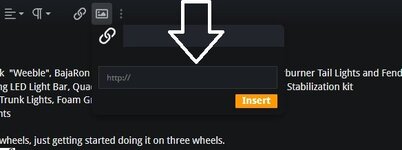
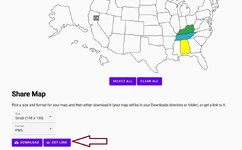
I have found that you can no longer drag and drop a picture into your sig line. You have to put in a "link". So build your map and then click on "get a link" and copy that into the link space on your sig line.

sig link.jpgStates map how to.jpg
 
Back
Top